
Swiss QR Invoice
Create print-ready Swiss QR invoices from Excel, CSV or manual input. No account, no cloud, directly on your Mac.
macOS 14+ · Swiss Payment Standards · 100% local processing
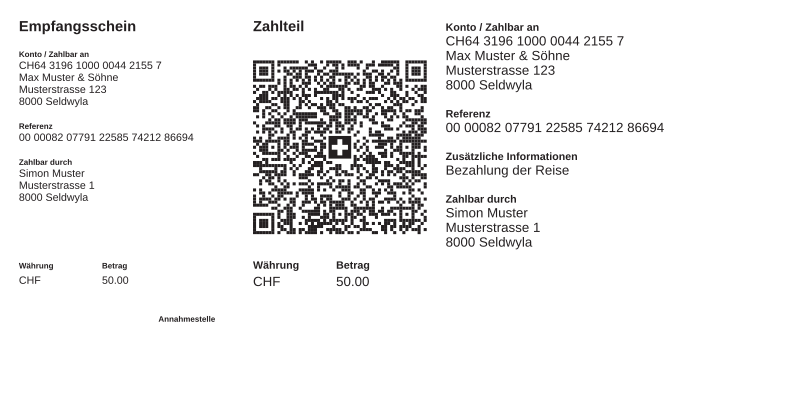
Batch output for Swiss QR Bills
For existing data sources, shipping workflows, fulfilment and prepress - locally on the Mac and aligned with Swiss Payment Standards.
Import existing data
Read CSV, TSV, TXT or Excel (XLSX) files and map columns cleanly to Swiss QR Bill fields, including large runs.
Reuse existing QR invoices
Open QR invoices from PDFs or images and use the extracted fields for correction, reproduction or further processing.
Production-ready preview
Check selected PDFs natively before export, useful for spot checks, approvals and print control.
Swiss Payment Standards check
IBAN, QR reference (modulo 10) and Creditor Reference (RF) are checked against the rules of the Swiss QR-bill.
Print-ready PDF output
A4 with payment part, 210x105 mm payment part or custom format, with background, bleed and cut marks for production.
Repeatable export settings
Save formats, lines, file names and numbering as profiles so production runs stay reproducible.
Multilingual payment parts
Generate payment parts in German, French, Italian, Romansh or English, selectable per record.
References for production runs
QR reference (QRR), Creditor Reference (SCOR/RF) or no reference, including automatic reference generation.
No ERP, no cloud
Swiss QR Invoice does not manage customers or accounting. It creates standards-compliant PDFs from data you already have.
From data batch to PDF output
For single payment parts as well as production runs from shipping, fulfilment or prepress workflows.
Import data source
Read CSV, XLSX, TXT, TSV or an existing QR invoice and map columns to the matching fields.
Check the standard
Required fields, IBAN, references and output options are validated before export.
Output PDFs
Create individual files or combined PDFs, with file names, numbering, bleed and cut marks as needed.
Batch workflows in a macOS interface
Import, checking and PDF output stay close to production workflows.
Simple pricing
Free is for individual PDFs. Pro is for production runs, batch export and repeatable output workflows.
Free
- Create unlimited single invoices
- Read QR codes from PDF or image
- Preview and Swiss Payment Standards check
Pro · Monthly
- Everything in Free
- Export multiple invoices in batches
- Combined PDF or one PDF per invoice
- Print-ready output options
- Separate exports for each invoice set
- Individual filename patterns for each set
Pro · Yearly
- Everything in Free
- Export multiple invoices in batches
- Combined PDF or one PDF per invoice
- Print-ready output options
- Separate exports for each invoice set
- Individual filename patterns for each set
Pro · Lifetime
- Everything in Free
- Export multiple invoices in batches
- Combined PDF or one PDF per invoice
- Print-ready output options
- Separate exports for each invoice set
- Individual filename patterns for each set
Purchase and management through the Mac App Store · monthly and yearly subscriptions can be cancelled anytime · Lifetime is a one-time purchase.
Compare all features
For recurring production runs
When many QR invoices need to be generated regularly from CSV, XLSX or existing data, Pro reduces manual invoice-by-invoice work.
For shipping and prepress
Pro fits workflows that need combined PDFs, one PDF per invoice, letterhead backgrounds, bleed or crop marks as part of the output.
For repeatable output
Profiles, filenames, numbering and output formats stay reproducible, so batch runs can be created consistently later.